Materials and textures#
A geometry’s Material says how its surface looks: its texture, whether light affects it, and whether it lets things show through. Without a material, a mesh is lit and colored by its vertex colors.
tex, err := nt3d.NewTexture(img) // any image.Image
mat := &nt3d.Material{Texture: tex, Repeat: true, Phong: nt3d.PhongStyle{Specular: .4}}
The shape of a material#
Two fields say what kind of surface a material is, and nothing else does:
| Field | Values | Meaning |
|---|---|---|
Shading | ShadePhong (the zero value), ShadePBR, ShadeUnlit | The lighting model |
Alpha | AlphaOpaque (the zero value), AlphaCutout, AlphaEdgeOn, AlphaTransparent | What the alpha of the texture and vertex colors does |
Everything else is a group, one per feature, and a group left zero is off:
| Group | Type | What it is |
|---|---|---|
Phong | PhongStyle | The highlight and reflection of a ShadePhong material |
PBR | PBRStyle | The surface of a ShadePBR material, with Specular, Clearcoat, and Sheen groups inside |
Normal | NormalStyle | A normal map, and the Flow that moves it |
Emission | EmissionStyle | Light of the surface’s own |
Transmission | TransmissionStyle | Seeing the scene behind through the surface |
Toon | ToonStyle | Banded shading |
A group’s type is always its field’s name with Style after it. The texture, Repeat, Tint, BaseColor, Threshold, LightMap, and Shader are fields of the material itself.
Three rules hold throughout:
- The model is what
Shadingsays. AShadePBRmaterial stays PBR when its roughness and metalness are zero, which is a mirror-smooth dielectric. Nothing switches the model by being set. - A group that belongs to another model is an error. Setting
PBRon a material that is notShadePBR, orPhongon one that is notShadePhong, is refused when the geometry is given to a scene, where it used to be ignored without a word.Material.Validatereports it. - A strength left zero means 1 wherever its group is in use (
Normal.Strength,Emission.Intensity,PBR.OcclusionStrength,PBR.Specular.Strength). To have none, leave the group or its map out, or set the flag the group has for it:PBR.NoOcclusion,PBR.Specular.Off.
Textures#
NewTexture takes a snapshot of any image.Image, up to 8192 pixels a side. Textures are sRGB, as images are, and both renderers filter them in linear light.
- Repeat. With
Material.Repeat, texture coordinates outside 0 to 1 wrap around, and filtering blends across the seams, so a texture made to tile shows none. Otherwise they clamp to the edge. The OBJ, PLY, and 3MF readers set it, since those formats tile by default. - BaseColor.
Material.BaseColormultiplies surface albedo (and scalesAlphaTransparentopacity byBaseColor.A / 255) from per-instance uniforms without re-encoding mesh vertices or detachingSharedGeometry; the zero value leaves vertex and texture colors unchanged. - Tint.
Material.Tintmultiplies the texture by the vertex colors. - Unlit.
ShadeUnlitshows colors as they are, ignoring the light.
Mipmaps#
A tiled floor running to the horizon packs many texels into each distant pixel, and without care it shimmers into moiré. nt3d keeps each texture with copies of itself halved down to one texel, averaged in linear light, and each pixel samples the copies that match how many texels it covers. Frame.Anisotropy (1 to 16; zero means 16) goes further: where a pixel covers a long, thin run of texels, as on a floor seen at a slant, it samples along the run, so the floor keeps its detail instead of blurring to gray. The GPU and software renderers do the same.
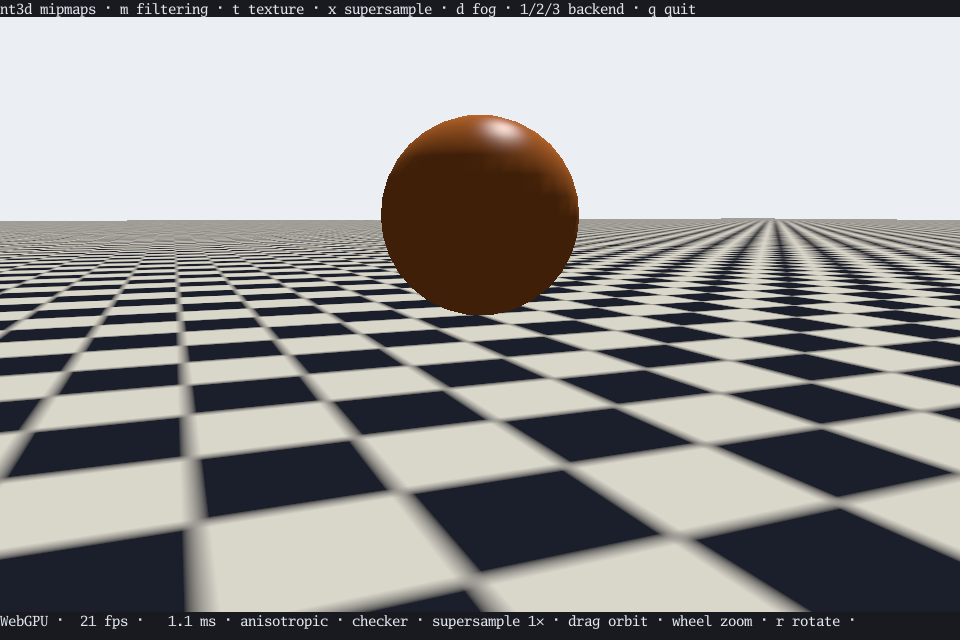
The mipmaps demo lets you turn them off to compare. Shader textures get them too, from the picture the shader draws each frame. Material.FullSize samples a texture full size, without its mipmaps, for comparing or for a texture that must never blur.
Cutout mipmaps#
Averaging a cutout’s alpha would thin it: far off, a strand’s texels blend with the transparent texels around them, fall under the threshold, and the strand vanishes or sparkles. So a cutout samples mipmaps of its own, whose alpha is rank-matched to the full-size texture: at each level, the texel at a given rank takes the alpha of the texel at that rank in the full-size image, as a renderer samples it, so the share of texels above any threshold stays about what it is at full size. One chain serves every threshold at once, which fur needs, since each of its layers cuts the same texture at its own height. Distant fur and leaves keep their density instead of thinning, and stop shimmering. Cutouts filter between levels but take no anisotropic taps, which would average them thin again.
The chain preserves how much shows, not exactly where: a thin strand far off becomes a somewhat wider, shorter one. Thresholds of one half and above hold within a few percent; below that a coarse level shows a little more, never less. It suits alpha that is tested, not blended (transparent materials keep the ordinary chain), and a level whose texels are wider than the shapes can only approximate them: far enough off that a whole tile fits in a pixel, a cutout covering under half its texture disappears and one covering more becomes solid. Shader cutouts sample full size, as the GPU averages the chain of the picture it draws.
Transparency and cutouts#
AlphaTransparent blends a mesh over what lies behind it, by the vertex colors’ alpha times the texture’s. By default (Frame.OIT == false), transparent meshes are drawn after everything opaque, farthest first, each with its back faces before its front ones, so a glass sphere shows its far side through its near one, and alpha-blended points sort with transparent meshes by depth slice. When transparent meshes intersect each other or fold over themselves, set Frame.OIT = true (or nt3dwidget.WithOIT(true) / SetOIT(true)) to draw all transparent meshes with McGuire & Bavoil Weighted Blended Order-Independent Transparency on both WebGPU (compatible with 1× and 4× MSAA) and software, eliminating mesh-order popping as the camera orbits. Wireframe and picking treat transparent surfaces as solid. Press t in the shapes demo to cycle opaque → glass (OIT) → glass (sorted) and compare.
AlphaCutout instead cuts holes: texels with alpha under Threshold (one half by default) aren’t drawn at all, and the rest are solid. It’s how leaves, fences, and fur are made, and it can’t be combined with AlphaTransparent. Picking passes through the holes. Far off, cutouts keep their density through mipmaps of their own.
AlphaEdgeOn shows a cutout only where the surface turns edge-on to the viewer, fading it out as the surface comes to face the camera. Fur uses it to fill in silhouettes. Wireframe and picking leave edge-on surfaces out.
Other materials ignore alpha.
Normal maps#
NewNormalMap(img) creates a linear-data normal texture. Assign it to
Material.Normal.Map and provide Geometry.UV; Normal.Strength scales it, and zero means 1.
GPU and software perturb diffuse, specular, and environment lighting. See
normal maps for sampling, tangent frames, animation, and glTF mapping.
Highlights and PBR#
Material supports both classic Blinn-Phong highlights and metallic/roughness physically based shading (PBR) in the same unified struct.
Classic highlights#
Material.Phong.Specular (0 to 1) adds a white highlight where the surface reflects the light toward the camera, and Phong.Shininess (1 to 1024, default 32) sets how tight it is. It’s worked out per pixel, so highlights stay round even on coarse meshes. Boxes, unlit materials, and wireframe have none.
Material.Phong.Reflectivity adds environment reflections.
Zero disables them; .02 suits water and 1 makes a mirror. When
EnvironmentBackgroundOnly keeps the sky as a backdrop without its light, a
reflection probe holding the sky is what
lets a surface still reflect it. Normal maps also perturb reflection direction. Unlit
materials ignore reflections.
Metallic/roughness PBR, Clearcoat, Sheen, and ORM maps#
Shading: ShadePBR lights a surface by Cook-Torrance GGX microfacet shading on both GPU and software, as its PBR group describes:
orm, err := nt3d.NewORMMap(ormImg) // R = occlusion, G = roughness, B = metallic
mat := &nt3d.Material{
    Shading: nt3d.ShadePBR,
    PBR: nt3d.PBRStyle{
        Metallic:  1.0,
        Roughness: 1.0,
        IOR:       1.5, // 1..3; zero means 1.5 (dielectric F0 = 0.04)
        // A dielectric top coat (car paint, varnish, wet asphalt), along the geometric normal.
        Clearcoat: nt3d.ClearcoatStyle{Amount: .95, Roughness: .08},
        // A cloth or velvet tint toward the silhouette.
        Sheen:             nt3d.SheenStyle{Color: color.RGBA{235, 175, 255, 255}, Roughness: .35},
        ORMMap:            orm,
        ORMRepeat:         true,
        OcclusionStrength: .85, // 0..1; zero means 1, and NoOcclusion ignores the map's occlusion
    },
}- Conductors vs. dielectrics.
PBR.Metallic(0 to 1) blends between a dielectric surface (diffuse base color plus Fresnel specularF0derived fromPBR.IOR, optionally tinted and scaled byPBR.Specular.ColorandPBR.Specular.Intensityper glTFKHR_materials_specular) and a conductor ((1 - PBR.Metallic)diffuse attenuation with base-color-tintedF0).PBR.Specular.Strength(0 to 1, zero means 1) scales the whole highlight, grazing angles included, andPBR.Specular.Offremoves it completely for chalky, matte surfaces (specularFactor = 0). A blackPBR.Specular.Color,color.RGBA{A: 255}(specularColorFactor = [0, 0, 0]), suppresses normal-incidenceF0while preserving grazing Fresnel reflections; the color’s alpha is ignored. - Roughness and prefiltered IBL.
PBR.Roughness(0 to 1) widens the GGX microfacet lobe and blurs environment reflections across a lazily prefiltered six-level GGX equirectangular mip chain combined with a split-sum Fresnel BRDF. Without an environment, hemisphere ambient provides grazing specular reflections. - Clearcoat.
PBR.Clearcoat.Amount(0 to 1) andPBR.Clearcoat.Roughness(0 to 1) add an energy-conserving dielectric top coat (PBR.IOR = 1.5,F0 = 0.04) evaluated along the unperturbed geometric surface normal. Base diffuse, base specular, and sheen beneath the coat attenuate by(1 - PBR.Clearcoat.Amount * Fc), whileNormal.Mapdetail (metallic car-paint flakes, wood grain, cobblestones) stays under a smooth glossy lacquer or rain-wet film with its own prefiltered environment IBL and GGX highlights. - Sheen.
PBR.Sheen.Color(sRGB; black disables) andPBR.Sheen.Roughness(0 to 1) add an Estevez & Kulla Charlie microfiber grazing/retroreflective lobe with Neubelt visibility and directional-albedo energy scaling for velvet, satin, felt, and character clothing. - Packed linear ORM maps.
NewORMMapsnapshots a linear-data texture following glTF’s channel layout: R scales indirect diffuse and specular ambient occlusion byPBR.OcclusionStrength(leaving direct lights unoccluded), G multipliesPBR.Roughness, and B multipliesPBR.Metallic.NewShaderORMMapandNewShaderORMMapWithParametersgenerate linear ORM mip chains on the GPU;Scene.SetNodeORMMapswaps an existing ORM map without reuploading geometry. - Composability. PBR, Clearcoat, and Sheen compose with
Toon(quantizing base GGX, clearcoat lacquer highlights, cloth sheen bands, and diffuse cel bands),Transmission/Transmission.Refraction/Transmission.Absorption(refracting behind diffuse before adding Fresnel reflections and GGX highlights),Normal.Map,AlphaCutout, andAlphaTransparent. Pressein the lights demo to comparePBR,PBR ORM+glow,coat+sheen,shiny, anddull.
Emissive colors and maps#
Any lit or unlit surface (except outline hulls and wireframe) can emit light of its own:
mat := &nt3d.Material{
    Shading: nt3d.ShadePBR,
    PBR: nt3d.PBRStyle{Roughness: .4},
    // An Intensity above 1 gives HDR light for Frame.PostProcess.Bloom.
    Emission: nt3d.EmissionStyle{Color: color.RGBA{255, 140, 40, 255}, Intensity: 3.5, Map: glowTex, Repeat: true},
}
Emission.Color is an sRGB color multiplied by Emission.Intensity (default 1 when zero) and optional Emission.Map (NewTexture or NewShaderTexture, replaceable via Scene.SetNodeEmissiveMap). Emission is added before fog. Values with Emission.Intensity > 1 exceed 1.0 in HDR scene passes and software float buffers, driving selective glow when Frame.PostProcess.Bloom is active.
Shader textures#
A texture can be drawn by a WGSL shader each frame, on the GPU, with an ordinary image as its fallback for software rendering:
tex, err := nt3d.NewShaderTexture(source, fallback)The source defines fn nt3dTexture(uv: vec2<f32>) -> vec4<f32>, returning an opaque color, with UVs starting at the top left. The fallback image sets the texture’s size and is what the software renderer shows.
To animate one, pass parameters: NewShaderTextureWithParameters(source, [4]float32{phase, 0, 0, 0}, fallback) exposes them to the shader as nt3dTextureParams, a vec4<f32> uniform at group 0, binding 0. Make a new texture for each step and give it to Scene.SetNodeTexture, with a fallback for the same step. When the source and size are unchanged, the renderer reuses its pipeline and only updates the uniform.
Each frame, the GPU first draws the texture, then the scene that samples it, on the same device and command encoder; only the finished picture is read back. Shaders compile lazily, so a mistake in one is reported when the frame renders. Custom bindings aren’t available.
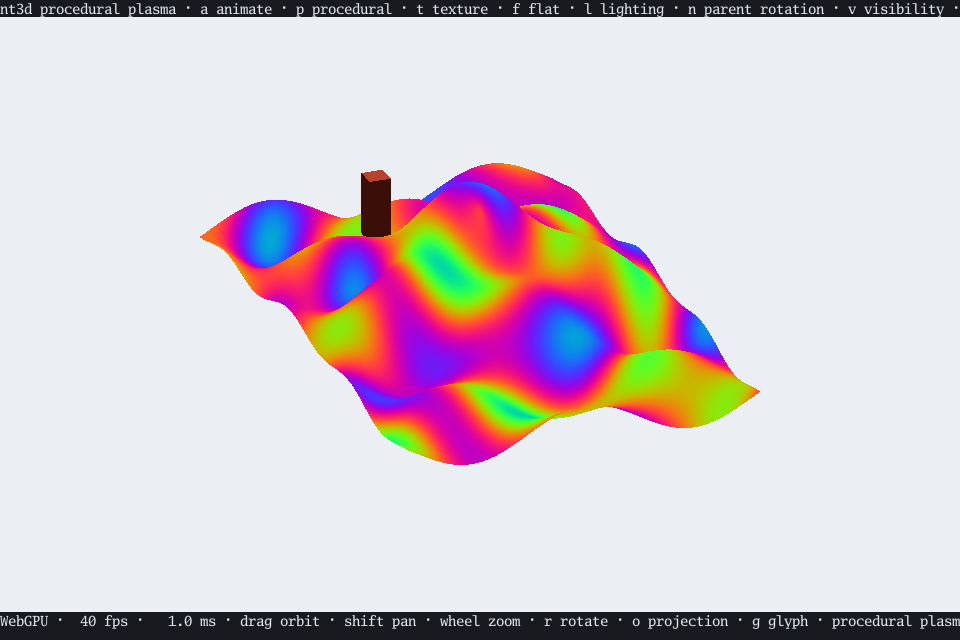
The procedural demo paints terrain with an animated plasma shader; procedural.go has the shader and its matching CPU fallback.
Vertex displacement and material shader hooks#
Beyond 2D shader textures, indexed triangle meshes can customize per-vertex displacement (Geometry.Displacement) and per-fragment linear surface color (Material.Shader) directly in the scene shader while keeping GPU, software, wireframe, shadows, and picking in parity via pure-Go fallbacks. Both hook types carry Time (float32, in seconds) and up to MaxShaderParameters (16) [4]float32 uniform vectors, and WithParameters advances them each frame without recompiling WGSL or re-uploading mesh buffers.
Naming your helpers. A hook’s WGSL is compiled into the scene shader’s own module, and WGSL has no namespaces: your functions, structs, constants, and module-scope variables share one set of names with the scene shader’s, and with the other hook when a mesh has both a displacement and a material shader. A helper that takes a name the scene shader uses (decode, Light, u, the engine’s own nt3d… and NT3D… names) is refused by NewVertexDisplacement and NewMaterialShader with an error naming it, and two hooks on one mesh that declare the same name fail that frame the same way. Names used only inside your functions are yours. A simple habit avoids both: prefix a hook’s helpers with something of its own, such as wave_height or ink_edge, and leave the nt3d and NT3D prefixes to the engine.
GPU renderers compile one program per distinct hook source and keep it while frames draw it. A program no frame has drawn for some 600 frames is released, and compiled again if its source returns, so generating shader sources does not grow memory for as long as the renderer lives. To animate a hook, change its parameters (WithParameters), which reuses the program, rather than its source.
Vertex displacement#
NewVertexDisplacement / NewVertexDisplacementWithParameters define fn nt3dDisplace(in: NT3DVertexInput) -> NT3DVertexOutput in WGSL alongside a VertexDisplaceFunc Go fallback and a conservative local-space maxDisplacement bound:
const waveWGSL = `
fn nt3dDisplace(in: NT3DVertexInput) -> NT3DVertexOutput {
    let amp = nt3dDisplaceParam(0u).x;
    let freq = nt3dDisplaceParam(0u).y;
    let phase = in.world.x * freq + in.time * 2.0;
    let dz = amp * sin(phase);
    let n = normalize(vec3<f32>(-amp * freq * cos(phase), 0.0, 1.0));
    return NT3DVertexOutput(in.position + vec3<f32>(0.0, 0.0, dz), n);
}
`

disp, err := nt3d.NewVertexDisplacementWithParameters(
    waveWGSL, 0.4, 0, [][4]float32{{0.35, 2.5, 0, 0}},
    func(in nt3d.VertexDisplaceInput) nt3d.VertexDisplaceOutput {
        amp, freq := in.Params[0][0], in.Params[0][1]
        ph := float64(in.World.X*freq + in.Time*2)
        dz := amp * float32(math.Sin(ph))
        n := (nt3dmath.Vec3{X: -amp * freq * float32(math.Cos(ph)), Z: 1}).Normalize()
        return nt3d.VertexDisplaceOutput{
            Position: in.Position.Add(nt3dmath.Vec3{Z: dz}),
            Normal:   n,
        }
    },
)
scene.ApplyDisplacement(root, disp)
In WGSL, NT3DVertexInput supplies (position, normal, world, uv, time) and nt3dDisplaceParam(i) reads vec4<f32> parameter i (0..15). Because in.world carries each instance’s world-space rest position, instanced SharedGeometry (such as foliage sway across thousands of shared trees) stays batched in a single draw call while varying smoothly across world space. maxDisplacement pads frustum-culling, shadow, and picking AABBs relative to rest bounds without accumulating drift or shifting DropShadow discs. Software rendering, CPU/GPU shadow maps, silhouette outlines, wireframe, and Scene.Pick / GPUSession.Pick all evaluate the displaced surface.
Material color shader#
NewMaterialShader / NewMaterialShaderWithParameters define fn nt3dMaterial(in: NT3DMaterialInput) -> vec4<f32> in WGSL alongside a MaterialColorFunc Go fallback:
const bandWGSL = `
fn nt3dMaterial(in: NT3DMaterialInput) -> vec4<f32> {
    let speed = nt3dMaterialParam(0u).x;
    let band = 0.5 + 0.5 * sin(in.world.z * 12.0 - in.time * speed);
    let rim = pow(clamp(1.0 - max(0.0, dot(in.normal, in.view)), 0.0, 1.0), 2.0);
    let rgb = mix(in.color.rgb, vec3<f32>(0.85, 0.95, 1.15), clamp(band * 0.4 + rim * 0.4, 0.0, 1.0));
    return vec4<f32>(rgb, in.color.a);
}
`

matShader, err := nt3d.NewMaterialShaderWithParameters(bandWGSL, 0, [][4]float32{{3.0}}, fallbackFn)
scene.ApplyMaterialShader(root, matShader)
NT3DMaterialInput / MaterialColorInput supply (world, normal, view, uv, color, time) in linear light after vertex color/tint, base-color Texture sampling, and Normal.Map perturbation, and before scene lighting (unless ShadeUnlit is true), emissive, and fog. Returned RGB values remain unclamped above 1.0 so custom shaders can drive HDR Bloom and tone mapping directly, while returned alpha (0..1) feeds AlphaCutout testing (including perforated directional/point/spot shadow maps and cutout outlines), alpha blending, and Weighted Blended OIT (Frame.OIT). Press w in the procedural demo to toggle both hooks live.
Outlines#
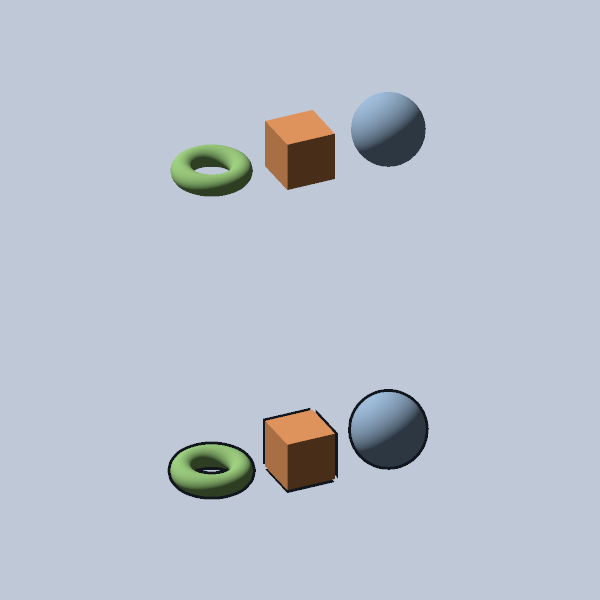
Top: no outlines. Bottom: three-pixel outlines, including the gaps at the cuboid’s split-normal corners.
Give indexed meshes a dark contour with Geometry.Outline:
mesh.Outline = nt3d.OutlineStyle{
    Width: 2, // output pixels by default, or world units with Units: nt3d.WorldUnits
    Units: nt3d.PixelUnits,
    Color: color.RGBA{R: 18, G: 22, B: 30, A: 255},
}
scene.SetGeometry("model", mesh)
The GPU and software renderer draw an expanded back-face hull in an unlit
color, making the outer silhouette stand out against busy backgrounds.
Units is PixelUnits by default (up to 32 output pixels, constant with
distance and supersampling) or WorldUnits (scaling with distance and
clamped to 32 output pixels). Color uses RGB;
its alpha is ignored. Nearer opaque geometry hides the contour, fog fades
it, and transparent meshes retain their vertex/texture opacity. Cutout
materials keep their alpha test. Morphs and skinning use the current posed
positions and normals; the GPU reuses its mesh buffers for the extra draw.
For a loaded character or an already animated subtree, use
scene.ApplyOutline(root, nt3d.OutlineStyle{Width: 2}). This preserves the
current pose and shared buffers; pass a zero style to turn it off.
Vertices that share a position with split normals (such as BuildCuboid,
cylinders, cones, and faceted meshes) expand along their averaged unit normal
on both renderers so their corners stay joined without gaps. Open
sheets do not acquire a full contour. It outlines the expanded geometry,
not alpha-mask boundaries; a back surface can show through
holes or glass. Outlines do not change picking or cast shadows. Wireframe
keeps its existing edge logic.
Crease lines#
The hull only shows a silhouette: the edges of a box that face you get no
line. Crease adds them:
mesh.Outline = nt3d.OutlineStyle{Width: 2, Color: ink, Crease: 30}Crease is an angle in degrees, 0 (off) to 180. Every edge where the mesh’s
two faces turn by more than that gets a line in the outline’s color and
width, in either unit. So does every open border, whatever the angle, and
every edge three or more faces share. Faces are joined by vertex position,
so meshes with a vertex per face corner (BuildCuboid, faceted imports)
work, and the diagonal across a flat quad never gets a line. Lines are depth
tested and fogged like the hull, and like it leave picking and shadows
alone. Scene.ApplyOutline changes the angle on geometry already in a scene;
nodes that show one SharedGeometry may each use their own.
Crease lines work on rigid and deforming meshes (skinned, morphed, in-place
vertex-updated, and VertexDisplacement meshes, including instanced
SharedGeometry) as well as see-through materials: AlphaCutout creases alpha-test
against textures and Material.Shader, Transmission creases draw after
transmissive front faces write depth so glass mullions show in front while back
edges stay hidden, and AlphaTransparent creases blend by vertex, texture, and
shader opacity in both depth-sorted slices and Weighted Blended Frame.OIT.
Static and posed meshes cache their extracted edges up to two angles per mesh,
and the GPU reuses its crease vertex buffers in place via WriteBuffer.
Try the shapes demo: press
b to toggle outlines and crease lines (t cycles opaque, OIT glass, and
sorted glass; also available on deforming models in the characters demo and animate), s to compare normal styles, and 1 / 2 to compare
GPU and software.
Toon shading#
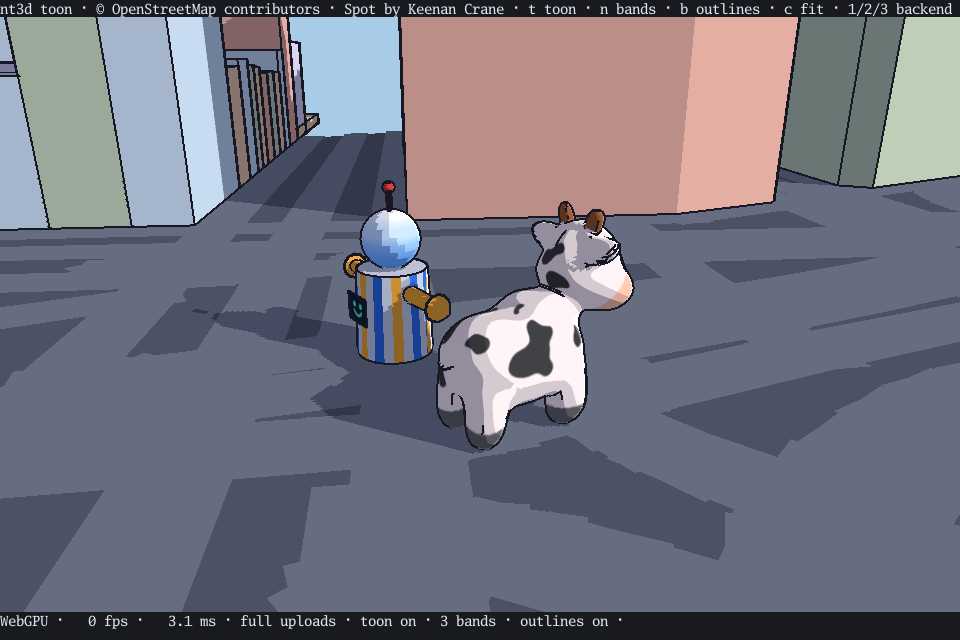
Material.Toon shades a mesh in flat bands, for a cel look:
mesh.Material = &nt3d.Material{Toon: nt3d.ToonStyle{
    Bands:          3,                              // tones from shade to fully lit, 2 to 8; 0 is off
    ShadowSoftness: .45,                            // cast-shadow penumbra softness, 0 to 1
    Shade:          color.RGBA{150, 160, 220, 255}, // tint of the unlit band; unset is white
    Rim:            .3,                             // highlight where a lit surface turns away, 0 to 1
}}
mesh.Outline = nt3d.OutlineStyle{Width: 2, Color: ink, Crease: 30}
Each light’s cosine snaps to the nearest of Bands even levels, while cast
shadows evaluate a continuous separable tent filter on directional, spot, and
point shadow maps and step cleanly from shadowed to lit. A point light’s
distance falloff is not banded: it stays smooth, and band edges follow shape
and shadow only. Softness (0 to 1) widens the blend between N·L cel bands
as a fraction of one band; at zero the GPU blends across about a pixel, so
edges do not shimmer. ShadowSoftness (0 to 1) widens both the tent shadow
filter footprint and the cast-shadow transition across shadow penumbras so
large city streets show no stair-stepped shadow-texel teeth, while leaving
curved surfaces’ N·L cel bands crisp in sunlight.
A toon surface takes flat ambient light, the midpoint of the sky and ground
colors plus an environment’s constant term, since a gradient would bring the
smooth shading back. Shade multiplies it: the unlit band is the base color
times the ambient times Shade, which lets shadows turn cool or warm rather
than only darker. Phong.Specular becomes a flat spot instead of a soft lobe, and
Rim adds a flat highlight on lit surface seen edge-on. Rim suits rounded
models; on a large flat floor it draws an arc where the view grazes it.
Textures, tint, normal maps, cutouts, transparency, reflections,
transmission, and fog work as before around the banded light. ShadeUnlit
materials ignore Toon; points, boxes, lines, and splats are not
affected. Fur is meshes, and takes it. The GPU and software renderer agree away from band edges.
For geometry already in a scene, such as a loaded or animated model,
scene.ApplyToon(root, style) sets the style on every indexed mesh under
root, giving a material to those without one and keeping their other
settings, poses, and buffers; the zero style turns it off.
The toon demo puts it together
with outlines and crease lines: t flips the look, n changes the bands, and
s toggles softened street cast shadows.
Toon fur#
Shell fur takes toon shading as it is: the shells and fins share
the skin’s normals, so the whole coat lands in the same band at each point,
with the strands still showing inside each tone. Set the style on the node
that holds the skin, shells, and fins with scene.ApplyToon.
Ink the skin only. An outline on the shells or fins fringes every strand,
so scene.ApplyOutline(root, …) on a furred model is not what you want.
Give the skin a hull as wide as the fur is long, in world units, and the
line sits at the tips:
scene.ApplyToon(coat, nt3d.ToonStyle{Bands: 3, Shade: shade})
scene.ApplyOutline(skin, nt3d.OutlineStyle{Width: fur.Length, Units: nt3d.WorldUnits, Color: ink})
World-unit outlines are clamped to 32 output pixels, which a very close
camera can reach. Press t in the fur demo
to see it.
Procedural normal maps#
NewShaderNormalMap(source, fallback) and
NewShaderNormalMapWithParameters(source, parameters, fallback) use the same
nt3dTexture WGSL entry point, returning tangent-space XYZ encoded into RGB
in [0,1]. Alpha is ignored. Assign the result to Normal.Map, and animate
with Scene.SetNodeNormalMap.
The render target and its mipmaps are linear data, without sRGB conversion.
Normal.Repeat chooses tiling or clamping. Software renders the supplied image,
which should evaluate the same pattern and parameters. The water demo
uses this path for periodic ripple normals.
Scene transmission#
Lit materials can sample the opaque scene behind their surface:
material := &nt3d.Material{
    Transmission: nt3d.TransmissionStyle{Amount: .94, Refraction: .018, Absorption: nt3dmath.Vec3{X: .85, Y: .28, Z: .12}},
    Phong: nt3d.PhongStyle{Reflectivity: .02},
}
Transmission.Amount is a 0–1 mix. Transmission.Refraction is a 0–1 screen offset measured in
fractions of viewport height, directed by the projected shading normal;
normal maps affect it. Zero gives undistorted transmission. Transmission.Absorption is
nonnegative RGB extinction per world unit: each channel is attenuated by
exp(-coefficient * distance) toward the lit surface color. Distance is the
view-ray segment to opaque geometry, capped at 1000 world units; missing depth
uses that cap. Use Linear rendering for attenuation in linear light.
Transmissive meshes write depth after the opaque scene is captured and before
ordinary transparency. They require normals and cannot use AlphaTransparent,
AlphaCutout, AlphaEdgeOn, or ShadeUnlit. Like transparent meshes, their triangles do not
cast shadow maps. Offscreen and foreground distortion samples fall
back to the original pixel. Only the opaque scene is captured, so stacked
transmissive layers and transparent objects behind them are not composited as
physical glass. Reflections still come from the environment.
Capture textures are private renderer resources. GPU and software share these material controls; procedural texture shaders remain independent of the scene. See Water for the complete example.
Flow-driven normal maps#
Material.Normal.Flow.Map takes an immutable NewFlowMap(image) field. Red/green
encode signed normal-UV displacement; 127/128 are neutral. The field is sampled
at Geometry.UV vertices, then interpolated per fragment. Normal.Flow.Repeat wraps
the field rather than clamping it. Use independent Geometry.NormalUV for
ripple tiling.
Set Normal.Flow.Strength to the displacement scale per cycle and animate Normal.Flow.Phase
in cycles. Two offset phases crossfade to avoid a discontinuity on reset;
zero strength disables flow. A flow map requires a normal map. It adds no
texture bindings and works in GPU and software, including normal-driven
reflection and refraction. Small field details require correspondingly dense
mesh vertices. Flow changes shading, not geometry or simulation velocities.
See Water for a shoreline example and tiled mesh API.
Replacing materials on a subtree#
For geometry already in a scene—such as a loaded glTF hierarchy, an animated
character, SharedGeometry instances, or multi-tier LOD nodes—Scene.ApplyMaterial
replaces (or clears, when nil) the material on every indexed triangle mesh
under root:
err := scene.ApplyMaterial(root, &nt3d.Material{
    Shading: nt3d.ShadePBR,
    PBR: nt3d.PBRStyle{Roughness: .25},
})
Every affected mesh (including all LOD tiers and deformed rest meshes) is
validated before any node is modified, so a missing UV set for a textured or
normal-mapped material returns an error without partial updates. When
vertex-baked fields (Tint, AlphaTransparent, AlphaCutout, Threshold, Repeat,
Normal.Repeat, AlphaEdgeOn, normal-map strength/tangent presence, and Normal.Flow.Map /
Normal.Flow.Repeat) are unchanged, existing GPU mesh buffers and SharedGeometry
instancing stay intact—including per-instance BaseColor, ShadeUnlit, PBR /
clearcoat / sheen parameters, Normal.Flow.Phase, Normal.Flow.Strength, Phong.Reflectivity,
Toon, or render-pass switches like Transmission. Changing a vertex-baked
field re-encodes only the affected mesh (detaching SharedGeometry into an
owned copy on that node).
Assets that bundle named colorways (SceneAsset.Variants and per-node
AssetNode.VariantMaterials, populated automatically from glTF
KHR_materials_variants) can also switch per instantiated root via
scene.MaterialVariants(root), scene.MaterialVariant(root), and
scene.SetMaterialVariant(root, name) (passing "" to restore each primitive’s
default material, reattaching SharedGeometry whenever vertex-compatible).